Folder Guard Settings |
|
Folder Guard Settings |
|

Use these screens to change the way Folder Guard operates to suit your requirements. To display this screen, use the Settings command on the Protect menu. This screen contains the following areas:
If selected, this option allows Folder Guard to display the splash screen with information about Folder Guard when its main application is starting. If you don't want to see the splash screen, clear this option.
If selected, this option causes Folder Guard to display the prompt to keep or skip the folders that you have previously protected, but no longer exist when you are starting Folder Guard or refreshing its window. To clear this option, use one of the Always keep or Always skip buttons on the prompt when it is shown.
Normally, while this option is cleared, when you close the Folder Guard application, it asks you whether to resume the protection:
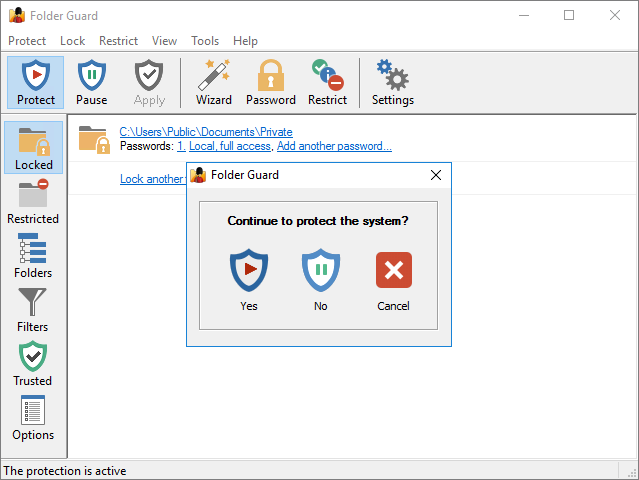
If you clear this option, Folder Guard will no longer display such a prompt and will always resume the protection when you exit its application.
If selected, this option causes Folder Guard to display the alternative folder names in the Folders view when managing This PC. (When managing a GPO, the alternative names are always displayed regardless of this option.)
The alternative names are usually the old-style (8.3) DOS names that Windows maintains for compatibility reasons in some situations. Some items, such as the drives, use their device names as the alternative names.
Note that this option only controls the visibility of the alternative names within the Folder Guard window. This option is off by default, because in most situations, there is no need to see the alternative names when managing This PC: Folder Guard detects and uses such names automatically, regardless of the status of this option.
If selected, this option causes Folder Guard to periodically connect to our web site to check for the availability of a newer version. If this option is not selected, then Folder Guard will display a message reminding you to check for the updates manually.

 Copyright © 2026, WinAbility® Software Corporation
  . All rights reserved